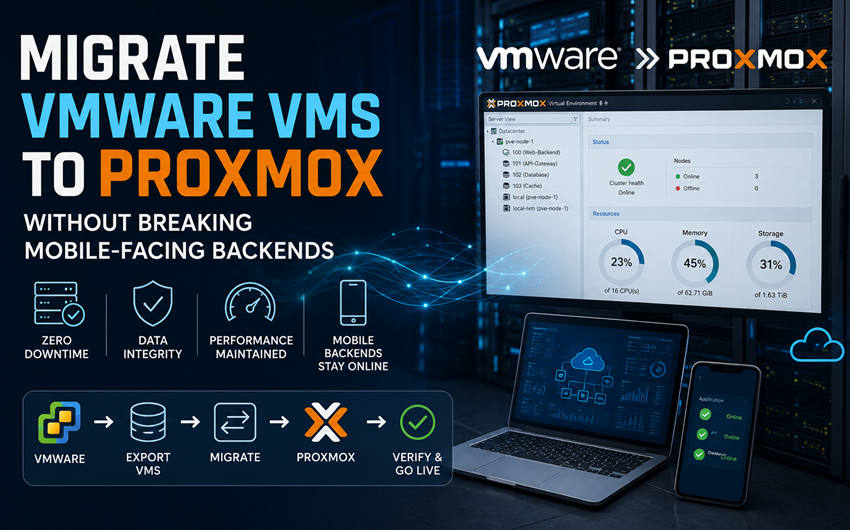
Migrate VMware VMs to Proxmox Without Breaking Mobile-Facing Backends

Mobile products rarely fail in the App Store listing. They fail when the API tier, push worker, or auth store behind the app goes dark during a platform change. Many of those backends still run as ordinary virtual machines on VMware ESXi — not as fancy serverless demos. When Broadcom-era renewals force a hypervisor rethink, the question is how to migrate VMware VMs to Proxmox without teaching every phone a new error screen.
This article is for product and platform teams that ship apps but still own on-prem or colo VMs: what to inventory, how to batch cutovers, and why Proxmox VE on KVM is a practical destination when licence pressure meets always-on mobile traffic.
Why mobile backends feel every hypervisor mistake
App users retry aggressively. A ten-minute API blip becomes a storm of duplicate POSTs, stuck sessions and support tickets that outlast the maintenance window. Unlike a quiet internal wiki, mobile-facing services need:
- Short, announced windows with honest rollback
- Stable DNS names and certificate behaviour
- Session/store consistency across the cutover
- Load-balancer health checks that match real client paths
Hypervisor migration is therefore a product risk, not only an ops chore. Treat dependency maps and smoke tests from real devices as part of the definition of done.
Host-fit reminder:
if your roadmap language is “releases and crash-free sessions,” write the migration plan in that language — not only in datastore jargon.
What changes when you leave VMware for Proxmox VE
Proxmox VE runs the same class of Windows and Linux guests on KVM, with clustering, live migration, snapshots and integrated backup options. Optional commercial support is typically sold per socket rather than as a punitive per-core tax on every staging clone and HA standby. For app teams that keep generous non-production estates, that licensing shape often matters as much as any feature matrix.
You still need day-2 discipline: monitoring, patch windows, immutable or offsite backups, and a restore drill before you trust the platform with a Friday release.
Inventory that mobile teams actually need
- List every VM the apps talk to — API, auth, push, media, analytics workers, admin panels.
- Mark stateful vs stateless — databases and session stores move with different rules than replica app tiers.
- Capture fixed IPs, VIPs and cert names — mobile configs hate surprise endpoints.
- Group into waves — never cut a database without its dependent API batch plan.
- Name a rollback owner — who powers the ESXi original back on if device smoke tests fail.
A cutover pattern that respects app calendars
- Build Proxmox beside ESXi with matching VLANs and storage performance checks.
- Pilot a low-risk VM (internal admin tool or staging API) to prove VirtIO drivers and backup restore.
- Move stateless app tiers first behind the load balancer.
- Migrate stateful components with replication or a short controlled switch.
- Validate journeys from real phones and tablets — login, sync, push receipt — not only
curlfrom a bastion. - Keep source VMs intact until sign-off; decommission VMware last.
Conversion itself (Proxmox import or virt-v2v) is plumbing. The product risk lives in batching, DNS TTLs and device-level checks. Published runbooks that walk through how teams migrate VMware VMs to Proxmox are useful as checklists — map them to your release calendar, not the other way around.
Drivers, disks and the “boots but feels slow” trap
Windows guests often need VirtIO drivers staged before or during conversion. Linux guests need VirtIO modules in the initramfs or first boot cannot find the disk. Emulated devices may boot and then punish API latency — always confirm paravirtualized disk and NIC after cutover. Snapshots and linked clones on the VMware side should be flattened before export.
Backups as release insurance
Mobile roadmaps assume you can roll forward. Infrastructure moves need the opposite skill: restore. Use the migration to establish scheduled backups on Proxmox — preferably with an offsite or immutable copy — and time a restore of a stateful VM before the first production wave. A green backup job without a restore drill is not insurance.
When to bring specialist help
Small estates with strong Linux skills can often pilot a handful of VMs in-house. Larger Windows footprints, complex networking, or a hard store-feature date are when a migration partner shortens risk. Specialists such as Proxmox Migracje focus on phased delivery with near-zero downtime targets so product teams stay on releases instead of living in a hypervisor ticket queue.
FAQ for app platform owners
Will users need to reinstall the app?
Not if API hostnames, certificates and auth endpoints stay consistent and you validate from sample devices in the window.
Can we migrate gradually?
Yes. Keep VMware and Proxmox side by side; move mobile-critical tiers only after a pilot proves restores and client behaviour.
What about CI runners and build agents?
Move them in an early non-critical wave. They are good VirtIO practice and free capacity before you touch production APIs.
A realistic timeline
Week-level discovery beats hero weekends. Inventory and dependency mapping take longest because they replace assumptions with a list. Building Proxmox can run in parallel without touching production. The pilot is a confidence tool. The mobile-critical batch is the only window users should notice — and if the map was honest, they notice a short announced pause rather than mysterious sync failures.
Bottom line
Leaving VMware is a cost decision; shipping it under a mobile backend is a product decision. Proxmox VE is a strong destination when waves protect APIs, auth and push paths the way you already protect store releases. Convert disks carefully, validate on real devices, keep rollback until Monday traffic looks boring — then the licence saving is a bonus on top of a quieter release train.
After the first wave
Document the exact convert path and device smoke checklist. Freeze new VMware growth unless a workload is truly stuck. Revisit only when inputs change: a new renewal quote, a failed wave, or a compliance finding. Curiosity belongs in the lab; thrashing after decision burns both platform and product teams.
If finance asks for a one-page outcome, give them stay / hybrid / migrate with dates. Hybrid without an end date is deferred shock — especially when every sprint still assumes VMware capacity for the next app feature.